AI Freelancing for Beginners: How You Earn Your First $100 Online
Most beginners try freelancing and fail to get their first client, not because they lack skill, but because they chase too many ideas, test too many tools, and never stick to one system. As a result, you can spend weeks learning random AI tricks and still have no portfolio, no buyers, and no money to show for it.
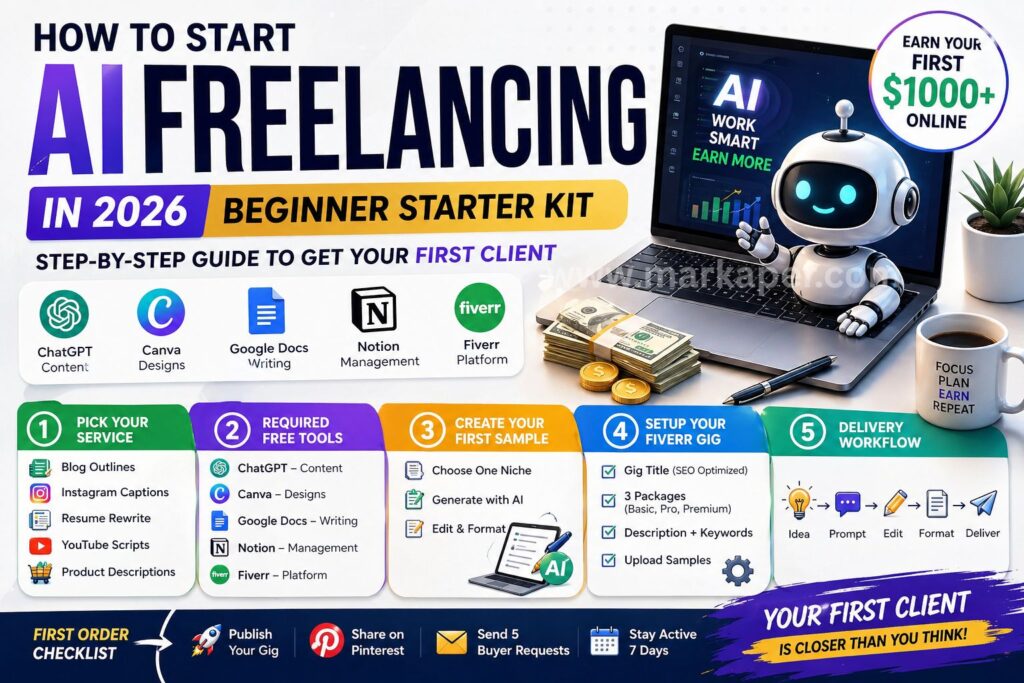
If you want to start AI freelancing for beginners the smart way, this guide gives you a clear path to your first $100 without spending upfront. You’ll use free tools, focus on one simple service, and launch on Fiverr, where some new AI freelancers have landed work in as little as 9 days. Start with the first step, picking one service you can offer well and deliver fast.
Key Takeaways
- You can earn your first $100 with AI freelancing by offering one simple service, using free tools, and focusing on fast delivery.
- The best beginner services in this article are blog writing, Instagram captions, YouTube scripts, product descriptions, and resume writing.
- Free tools like ChatGPT, Canva, Google Docs, Notion, and Fiverr are enough to create samples, deliver work, and start getting clients.
- A strong sample, a clear Fiverr gig, and daily outreach for 7 days give beginners the best chance of landing a first order.
- Clients pay for clean, useful results, so AI should speed up drafting, while you handle editing, formatting, and quality control.
“This post may contain affiliate links. Read our disclosure for more info.”
Start with one simple AI service you can sell this week
If you want fast progress in AI freelancing for beginners, start small. Your first goal is not to build an agency or master ten tools. Your goal is to offer one simple service that you can finish well, show in a sample, and sell this week.
That matters because beginners often lose time by switching offers. One clear service is easier to learn, easier to explain, and easier for a client to buy. Pick something practical, use AI to speed up the first draft, then edit it so it sounds human and useful.
The easiest AI freelancing services for beginners to offer first
A few services are easier to sell because clients already understand them. They also do not need advanced design skills or expensive software. If you can write clearly, follow a brief, and make clean edits, you can start.

Blog writing is a solid first option if you like research and structure. Small businesses, affiliate sites, coaches, and local brands need posts that answer questions and bring in traffic. AI helps you draft outlines, title ideas, and first versions fast, then you clean up facts, tone, and flow. A simple starter offer could be one 800-word post for a fitness coach or local plumber.
Instagram captions are one of the fastest services to deliver. Shops, creators, gyms, salons, and personal brands need fresh posts all the time, but many run out of ideas. AI can give you caption drafts, hooks, hashtag ideas, and post angles in minutes. You just shape them to fit the brand voice and the goal of the post.
Resume writing works well if you are good at turning messy details into clear value. Job seekers need help because many resumes sound flat or too generic. AI can rewrite bullet points, improve wording, and help tailor resumes for a role, while you make sure the result sounds credible and specific. This is a simple service because the problem is easy to understand, and clients often want quick turnaround.
YouTube scripts are a strong pick because video creators need content every week. Many solo creators, faceless channels, and small brands need scripts that keep people watching. AI can help with outlines, hooks, talking points, and rough drafts, which saves a lot of time. Then you improve pacing, add smoother transitions, and remove robotic wording. Right now, this is one of the better opportunities because demand for AI-assisted content work keeps rising.
Product descriptions are great if you want short, repeatable tasks. Online stores need clear copy for products, collections, and listings. AI can create draft descriptions fast, highlight features, and suggest benefit-driven phrasing. You step in to make the copy accurate, persuasive, and matched to the customer. A store owner with 20 items often prefers hiring one freelancer over writing every listing alone.
Here is the simple pattern: each of these services solves a clear problem, and AI helps you finish faster. That is why they fit beginners. You are not selling “AI.” You are selling a useful result.
Clients don’t buy prompts. They pay for clean work that saves them time.
How to choose the best service for your first $100
The best first service is the one you can create a sample for today. That should guide your choice more than hype. If you can make one strong sample in a few hours, you can start pitching sooner and learn faster.
Start with four filters: skill, interest, speed, and demand. If you already write decent captions, do not force yourself into long blog posts. If you enjoy video content, YouTube scripts may feel easier than resumes. Also, think about delivery speed. Shorter jobs often help you reach your first $100 faster because you can finish more orders and collect reviews sooner.
The current market also gives you a clue. AI-assisted writing work is active on freelance platforms, and social content is especially strong. YouTube scripts and Instagram captions have seen high demand, while blog posts and product descriptions still sell well to small businesses and online stores. Resume writing can still work, but it usually depends more on trust and personal positioning.

To make your choice easier, use this quick comparison:
| Service | Best if you like | Speed to deliver | Buyer type |
|---|---|---|---|
| Instagram captions | Short-form writing, social media | Fast | Creators, local brands, small businesses |
| YouTube scripts | Video content, storytelling | Medium | YouTubers, faceless channels, marketers |
| Product descriptions | E-commerce, simple copy | Fast | Shopify stores, Amazon sellers, boutiques |
| Blog writing | Research, structure, longer writing | Medium | Bloggers, agencies, service businesses |
| Resume writing | Editing, organizing experience | Medium | Job seekers, career changers |
The smartest move is to choose one service and one niche. That makes your offer feel focused right away. For example, instead of “I write captions,” say “I write Instagram captions for fitness coaches.” Instead of “I do product descriptions,” say “I write product descriptions for tech accessories.” A niche makes you easier to remember, and your sample will look more relevant.
Good starter niches include:
- Fitness, because coaches, gyms, and supplement brands need steady content
- Tech, because apps, gadgets, and SaaS brands need clear copy
- Business, because consultants and creators need posts, scripts, and blogs
- Local services, because dentists, cleaners, roofers, and salons often need simple marketing help
If you are still stuck, pick the service that meets these three rules:
- You can finish a sample today.
- You understand the client’s problem.
- You would not mind doing it three times this week.
That is enough to get moving. In AI freelancing for beginners, speed matters early, because action teaches you more than planning. Pick one offer, one niche, make one sample, and go get your first buyer.
Use free AI tools to do the work faster, without spending money
You do not need paid software to start. For AI freelancing for beginners, a small free stack is enough to write faster, stay organized, and find buyers. What matters is not having more tools. What matters is using a few tools well, in the same order every time.
The only free tools you need to begin
Start with tools that cover the whole job, from idea to delivery. If you keep your setup simple, you will waste less time and finish work faster.
ChatGPT helps you get unstuck fast. You can use it to brainstorm topics, build outlines, draft first versions, rewrite weak sentences, and clean up messy notes. In 2026, the free version is still beginner-friendly because the writing help is better, research is easier, and file or image-based tasks can save time on simple client work. That means you can move from blank page to rough draft in minutes.
Canva handles the visual side. You can make gig images, simple social graphics, PDF covers, and clean sample pages without design skills. Its AI features now help you create layouts, remove backgrounds, improve images, and speed up basic design work, which is useful when you need a Fiverr gig to look polished.

Then keep your writing and admin clean with the rest of your stack:
- Google Docs gives you a simple place to write, edit, comment, and share files with clients.
- Notion helps you track orders, due dates, revisions, and daily tasks in one place.
- Fiverr is where you list your service, upload samples, and find buyers without paying to start.
These tools are free and enough to start earning. If you can write, edit, and follow a brief, you already have what you need.
A simple workflow for using AI without sounding generic
AI should give you a first version, not the final version. That one rule will save you from robotic work and unhappy clients. Buyers do not pay for raw AI output. They pay for clear, useful results that sound natural and solve a real problem.
Use a basic workflow every time:
- Idea: Define the topic, goal, audience, and tone.
- Prompt: Ask AI for a rough draft or outline.
- Draft: Let AI produce the first version quickly.
- Edit: Fix facts, remove filler, add specifics, and match the client’s voice.
- Format: Clean the layout, headings, bullets, and spacing.
- Deliver: Send a polished file with a short message and clear next step.
That process keeps you fast without sounding lazy. In other words, AI does the heavy lifting at the start, and you do the work that makes it worth paying for.
For writing tasks, your prompt does not need to be fancy. It just needs to be clear. For example:
- “Write an outline for an 800-word blog post about home gym mistakes for beginners. Use simple language and practical tips.”
- “Write 10 Instagram captions for a fitness coach who wants more personal training leads. Keep the tone friendly and direct.”
After that, read every line and make it better. Add examples. Cut repeated phrases. Replace weak wording with plain, human language. Your job is to turn speed into quality. That is how you make free tools feel like paid skill.
Create strong samples so clients trust you before you have reviews
When you’re new, your sample is your proof. It shows clients what you can do before anyone has left a review, placed a repeat order, or sent a referral. In AI freelancing for beginners, that matters a lot because buyers want less risk, and a clean sample lowers that risk fast.
You don’t need a huge portfolio. You need one or two strong pieces that match the service you want to sell. If your sample feels relevant, clear, and polished, many clients will trust that more than a weak profile with no direction.
How to build your first sample in less than an hour
Start by choosing one niche and one service. Keep it narrow so your sample looks like it was made for a real buyer. “Blog writing” is too broad. “Blog writing for fitness coaches” is much easier to trust.
Then pick a sample topic that matches that niche. Make it practical, not clever. A few easy options work well:
- A fitness blog post called “5 Home Workout Mistakes Beginners Make”
- A skincare product description for a vitamin C serum
- A YouTube script intro for a business channel about side hustles
Now open your AI tool and ask for a rough draft. Give it a simple prompt with the audience, tone, and goal. For example, you could ask for a friendly blog post intro for beginners, a product description that focuses on benefits, or a short script hook that keeps viewers watching.

Once the draft is ready, your real job starts. Edit it by hand. Cut anything that sounds stiff, vague, or repeated. Replace generic lines with simple details a real client would want. If the AI writes “This amazing product helps improve your skin,” rewrite it into something useful, like “This lightweight vitamin C serum helps brighten dull skin and layers well under sunscreen.”
A simple process keeps you moving:
- Pick a niche you can understand today.
- Choose one realistic sample topic.
- Generate a first draft with AI.
- Rewrite weak lines in your own words.
- Clean the layout in Google Docs or Canva.
- Export it as a shareable file or PDF.
Formatting matters more than most beginners think. Add a clear title, clean headings, short paragraphs, and consistent spacing. If you’re making captions, group them neatly. If you’re making a blog sample, show subheads and flow. If you’re making a script, break it into hook, body, and call to action. A tidy sample feels safer to buy.
AI can help you start fast, but your manual edit is what makes the sample worth trusting.
What makes a sample look professional instead of obviously AI-made
Clients can spot lazy AI work fast. They may not know the exact prompt, but they can feel when the writing is flat, padded, or empty. That is why your sample needs more than correct grammar. It needs clarity, specifics, and confidence.
First, tighten the language. AI often uses soft, repetitive phrasing that says little. Remove lines that sound broad or fake. If a sentence could fit any brand in any niche, it is too weak. Swap it for something grounded. Mention the target audience, the use case, or the result.
Next, add details that make the piece feel real. A fitness post should mention beginner form, rest days, or home equipment. A skincare description should note texture, skin type, or how the product fits into a routine. A YouTube intro should sound like a person talking to viewers, not a robot filling space.

You also need to check facts. If your sample mentions ingredients, health claims, or stats, verify them. Even one sloppy claim can break trust. In AI freelancing for beginners, trust is your first currency, so protect it.
Here is what usually improves a sample fast:
- Remove fluff and empty filler
- Fix robotic or awkward lines
- Cut repeated ideas
- Add concrete details
- Check facts and claims
- Format the page neatly
A professional sample also looks organized on the page. Use readable headings, white space, and a clean font. If you want to go one step further, show the sample in a simple PDF with your name, service, and niche at the top. Keep it minimal. You want the work to feel easy to scan.
Most importantly, remember what the client is buying. They are not paying for raw words. They are paying for a result, more clicks, more sales, better content, or less work on their plate. Your sample should make that result feel likely. When your writing sounds clear and sure, you sound like someone who can deliver.
Set up a Fiverr gig that can win your first order in 2026
Your gig is your storefront. If it looks vague, cheap, or confusing, buyers move on fast. In AI freelancing for beginners, a strong Fiverr setup matters because you do not have reviews doing the selling for you yet.
The good news is that you do not need a perfect profile to get started. You need a clear offer, fair pricing, and a gig page that feels safe to buy from. Keep it simple, make every line buyer-focused, and remove anything that sounds generic.
How to write a Fiverr gig title and description that gets clicked
Start with what the buyer wants, not the tool you use. Buyers are shopping for an outcome, such as better captions, a polished resume, or a blog post that saves them time. They are not opening Fiverr to buy “ChatGPT content.”
A weak title sounds like this: I will use AI to write content for you. It says almost nothing. A stronger title sounds like this: I will write SEO blog posts for your small business. That version is clear, specific, and easy to trust. If you want, you can mention AI later in the description as part of your process, but the title should lead with the result.
Your description should answer the buyer’s first five questions right away:
- What will you deliver?
- How fast will you deliver it?
- How many revisions are included?
- What tools do you use, if relevant?
- What result can the client expect?
Write like a real person, not a brochure. For example, say you deliver one 800-word blog post, formatted in Google Docs, within two days, with one revision included. If AI helps your workflow, mention that you use it for research or first drafts, then edit by hand for clarity and originality. That keeps your pitch honest and useful.
A simple description structure works well:
- Open with the problem you solve.
- State exactly what is included.
- Mention timing and revisions.
- Explain your process in one short line.
- End with the result for the client.
Buyers click when your gig promises a clear result and removes doubt.
Smart beginner pricing to reach your first $100 faster
When you are new, simple pricing beats clever pricing. You do not need five confusing options. You need three clean packages that feel easy to compare and easy to buy.
This starter setup works well:
| Package | Price | What to include |
|---|---|---|
| Basic | $10 | One small task, fast delivery, limited revision |
| Standard | $25 | More depth, extra word count or quantity, one to two revisions |
| Premium | $50 | Bigger deliverable, faster turnaround, more polish or bonus add-on |
This matters because your first $100 often comes faster through a few small wins. Four $25 orders can happen sooner than one $100 order, especially when you are still building trust. In AI freelancing for beginners, momentum matters more than chasing a big client too early.
You can also overdeliver, but do it with control. Add a small extra, such as one bonus caption, a cleaner file format, or a faster reply. Do not turn a $10 order into an hour-long custom project. The goal is to impress the buyer without training them to expect too much for too little.

After you collect 5 to 10 strong reviews, raise your prices. At that point, your gig has proof behind it, and buyers are more willing to pay for confidence. Until then, keep your offers clean, fast, and easy to say yes to.
How to make your gig look trustworthy when you are brand new
Trust starts with the basics. Use a clear profile photo with good light, a simple background, and a natural expression. Your bio should explain who you help, what you offer, and how you work. Keep it short and direct.
Next, make your gig visuals clean. Upload sample images that match the service you sell. If you write blog posts, show a polished blog sample. If you sell captions, show a neat sample page with grouped caption sets. Your thumbnail should look tidy, readable, and consistent with the rest of your profile. Messy visuals make buyers assume the work will be messy too.
Clear communication does a lot of heavy lifting when you have no reviews. Reply fast, ask smart questions, and confirm what the buyer will get before you start. A new seller who communicates well can feel safer than an experienced seller who sounds careless.

You also need to stay inside Fiverr’s rules. Keep it simple:
- Be honest about the work you provide
- Deliver original output, not copied text
- Make sure you have the right to use and sell what you create
- Do not use misleading samples or fake claims
Fiverr allows AI-assisted work, and newer options like style training can help you speed up delivery while keeping your voice consistent. Still, the basics matter more right now. A clean profile, real samples, and honest communication will help you win trust before any advanced feature does.
If your gig looks clear and safe to buy, you already stand out from most beginners. That is often enough to get the first click, the first message, and the first order.
Follow a 7-day action plan to land your first client and deliver great work
Most beginners in AI freelancing for beginners don’t need more tips, they need a short plan they can actually follow. Your first client usually comes from repetition and visibility, not from waiting for the perfect gig setup. If you stay active for one focused week, you give buyers more chances to find you, trust you, and hire you.
Your first order checklist for the next 7 days
Your first week should look simple on paper and steady in practice. The goal is to put your offer in front of people every day, while giving them proof that you can do the job well.
Start with this checklist and treat it like your work plan for the week:
- Publish your gig
- Upload samples
- Share your offer on Pinterest or social platforms
- Send 5 to 10 tailored buyer requests or proposals each day
- Stay active for 7 straight days
Each step matters for a reason. Publishing your gig gives you a place to send people. Without that, your service is invisible. Uploading samples gives buyers a fast way to judge your work, especially when you have no reviews yet. A clean sample lowers doubt.

Then, share your offer on Pinterest or social platforms because traffic does not have to come from Fiverr alone. A simple pin, short post, or before-and-after sample can send curious people to your gig. This is an easy extra push, and it helps if platform traffic is slow.
Most important, send tailored proposals every day. Don’t paste the same message. Mention the buyer’s need, say what you’ll deliver, and keep it short. Current Fiverr trends still favor writers who can turn rough AI text into clear, human work, so your pitch should sound specific and useful.
Finally, stay active for 7 days. That matters because most beginners quit too early. One quiet day means nothing. A full week of posting, pitching, and replying gives your offer time to gain traction.
Your first order usually comes from consistency, not luck.
A simple delivery system that turns one order into repeat work
Once someone hires you, your job is to make the process easy. Clients come back when the work is good, but also when the experience feels smooth. That’s where a simple system helps.
Use this beginner workflow every time:
- Understand the brief
- Ask one or two clear questions
- Create the first draft with AI
- Edit it by hand
- Format it neatly
- Deliver on time
Start by reading the brief slowly. Look for the goal, tone, audience, and deadline. If something is unclear, ask one or two smart questions before you begin. That shows you pay attention, and it prevents avoidable revisions later.
Next, use AI to speed up the first draft, then do the part that clients actually pay for. Clean up the voice, remove repeated lines, fix facts, and make the work feel human. In AI freelancing for beginners, this is where average work becomes paid work.
After that, format the file so it feels ready to use. Headings, spacing, bullet points, and file names all matter. A messy delivery makes strong work look weaker than it is.
Speed matters, but speed plus quality is what gets repeat clients. If you deliver clean work fast, reply clearly, and handle one revision without drama, buyers remember you. That’s how one small order can turn into weekly work.
Keep a reusable system in Google Docs or Notion so you don’t start from zero each time. Save proposal templates, client question prompts, delivery messages, revision replies, and sample structures. Your workflow gets faster with every order, and your service starts to feel more professional.
Extra ways to grow past your first $100
Once you get momentum, add small upgrades that increase your income without changing your whole model. Keep these simple so they support your freelance work instead of distracting from it.
You can grow in a few easy ways:
- Add gig extras, such as faster delivery, extra captions, or another revision.
- Share affiliate links for tools you already use and honestly recommend.
- Create a free prompt PDF and use it as a lead magnet.
- Build a simple email list so visitors can hear from you again later.
These steps work because they build on what you’re already doing. If someone likes your content or samples but doesn’t hire you yet, a free prompt guide can turn that visit into a subscriber. Later, you can promote your service, useful tools, or new offers without starting over each time.
Keep the main goal in focus, though. Your first win comes from getting hired, doing solid work, and making that buyer want to come back. Once that system works, small add-ons can help you move past your first $100 much faster.
Conclusion
Your first $100 online gets a lot more realistic when you stop chasing every idea and follow one clear system. For AI freelancing for beginners, that means you pick one service, use free tools, create one strong sample, publish a clean Fiverr gig, and take daily action for 7 days. Because you already have enough to start, you do not need money upfront, you need focus and consistency.
The biggest win is not mastering every AI tool. It is learning how to turn a rough draft into work a client will trust, use, and pay for. If you stay simple and keep showing up, your first order can turn into reviews, repeat work, and a much easier path to your next $100.
If you want a faster start, download the free AI prompts, check the recommended tools, and use them to publish your first offer today.
Read Also: 17 Legit Ways to Make Money Online in 2026 You Can Start Now
Frequently Asked Questions About AI Freelancing for Beginners
1. How can a beginner start AI freelancing with no money?
A beginner can start by choosing one service, using free tools, and creating one strong sample. This article recommends free tools like ChatGPT, Canva, Google Docs, Notion, and Fiverr, so there is no need to buy software upfront.
2. What is the best AI freelancing service for beginners?
The best service is the one you can sample quickly and deliver well this week. Based on the article, Instagram captions, product descriptions, blog writing, YouTube scripts, and resume writing are the easiest starting points because clients already understand them.
3. How do beginners get their first client in AI freelancing?
Most beginners get their first client by publishing a focused Fiverr gig, uploading relevant samples, and sending tailored proposals every day for a week. The article’s 7-day action plan is strong because it pushes daily visibility and consistent outreach.
4. Do clients want raw AI writing?
Clients want edited work, not raw AI output. The article makes this clear by showing that AI should help with outlines and drafts, while the freelancer improves facts, tone, structure, and readability before delivery.
5. How long does it take to make the first $100 with AI freelancing?
The timeline depends on the offer, sample quality, Fiverr setup, and daily outreach. This article positions the first $100 as realistic when the beginner picks one service, posts a clear gig, and takes action for 7 straight days.
Read Also: How to Start Affiliate Marketing With Zero Investment in 2026
Affiliate Disclosure (FTC Compliant)
In accordance with the Federal Trade Commission’s guidelines, please assume that some of the links on this website are affiliate links. This means that I may earn a commission if you click on a link and make a purchase, at no additional cost to you.
As an affiliate, I only promote products and services that I have either used personally or thoroughly researched and believe will add value to my readers. Any compensation received does not influence the content, topics, or recommendations made on this website.
I am a participant in various affiliate advertising programs, including but not limited to programs designed to provide a means for websites to earn advertising fees by advertising and linking to products or services.
Please understand that your decision to purchase any product or service is entirely your own responsibility, and you should conduct your own due diligence before making any financial decisions.
If you have any questions regarding this disclosure, feel free to contact me.
Thank you for supporting this website.
About The Author
